API Reference
HomelabARR has a REST API for scripting, automation, and building integrations. Everything the dashboard does, the API can do too.
Base URL: https://homelabarr.YOUR-DOMAIN/api/ (behind Traefik — recommended) or http://YOUR-SERVER-IP:8092 (LAN-only, development)
TLS required for any non-loopback use. Examples below show LAN-only http for local testing. For any deployment reachable from outside the host, put HomelabARR behind Traefik (or another TLS-terminating proxy) and use https. Never transmit bearer tokens over plaintext on a non-loopback network.
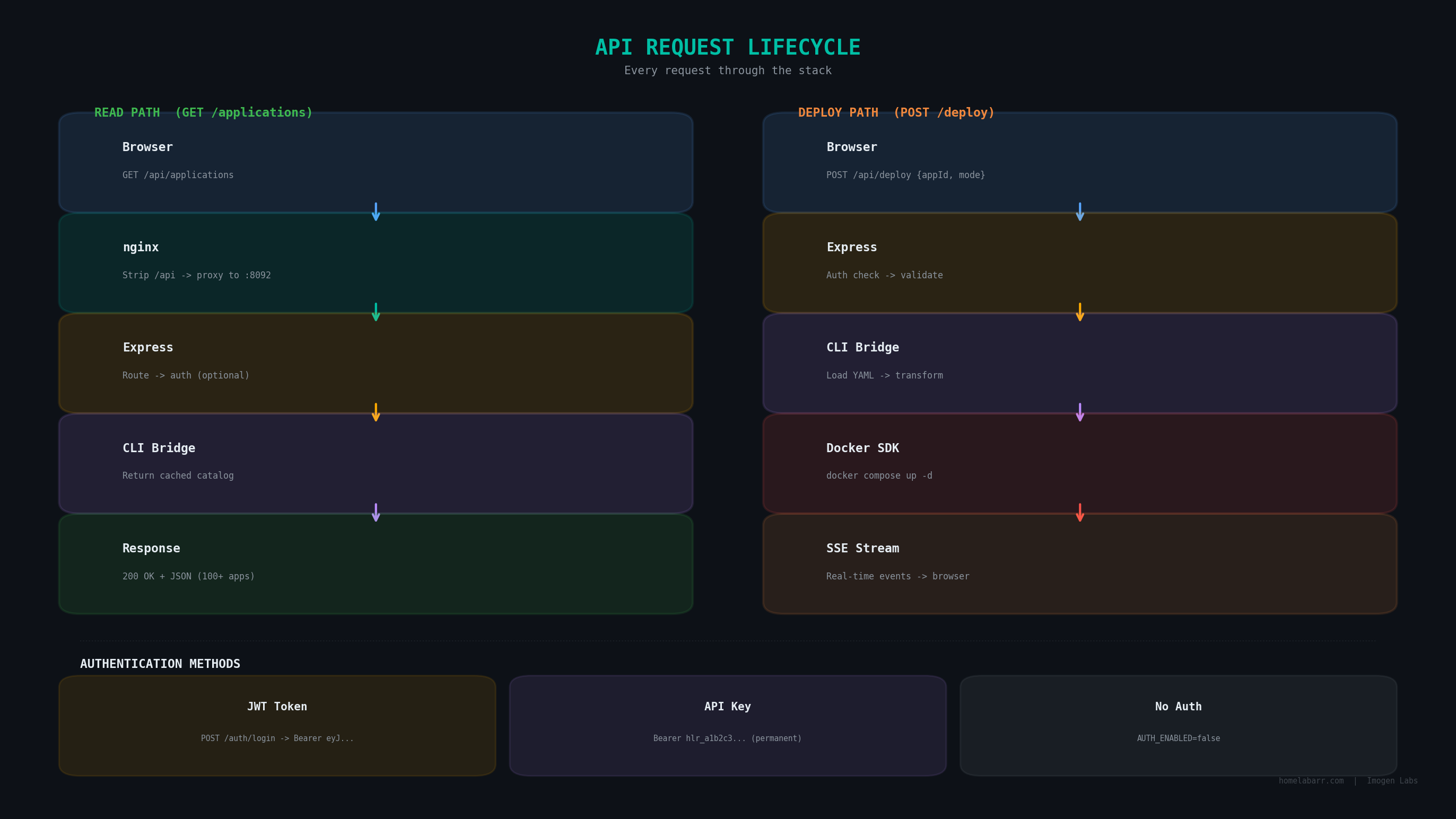
Authentication
Most endpoints require a valid token or API key.
Auth is required by default
When AUTH_ENABLED=true (the default), endpoints marked with * in the table below require authentication. Disabling auth removes login protection from the entire API — don't do this on a networked server. See the Configuration guide for details.
Get a Token
curl -X POST http://YOUR-SERVER-IP:8092/auth/login \
  -H "Content-Type: application/json" \
  -d '{"username": "admin", "password": "admin"}'
Response:
{
  "token": "eyJhbGciOiJIUzI1NiIs...",
  "user": { "username": "admin", "role": "admin" }
}
Token expiry
JWT tokens expire after a short time (controlled by your JWT_SECRET setup). For long-running scripts or automation, use API keys instead — they don't expire until you revoke them.
Use the token in all subsequent requests:
curl -H "Authorization: Bearer YOUR_TOKEN_HERE" http://YOUR-SERVER-IP:8092/applications
API Keys (Better for Scripts)
# Create an API key
curl -X POST http://YOUR-SERVER-IP:8092/auth/api-keys \
  -H "Authorization: Bearer YOUR_TOKEN" \
  -H "Content-Type: application/json" \
  -d '{"name": "my-script"}'
Response:
{
  "key": "hlr_a1b2c3d4...",
  "name": "my-script",
  "id": "abc123"
}
Save your API key
The full key is only shown once. If you lose it, delete it and create a new one.
Use it exactly like a token:
curl -H "Authorization: Bearer hlr_your_key_here" http://YOUR-SERVER-IP:8092/applications
Manage your keys:
# List keys (names only — keys themselves are not re-displayed)
curl -H "Authorization: Bearer YOUR_TOKEN" http://YOUR-SERVER-IP:8092/auth/api-keys

# Delete a key
curl -X DELETE -H "Authorization: Bearer YOUR_TOKEN" http://YOUR-SERVER-IP:8092/auth/api-keys/KEY_ID
App Catalog
# Get all available apps
curl http://YOUR-SERVER-IP:8092/applications
Sample response:
{
  "success": true,
  "data": [
    {
      "id": "media-servers-plex",
      "name": "Plex",
      "category": "media-servers",
      "image": "lscr.io/linuxserver/plex:latest",
      "description": "Plex Media Server"
    }
  ],
  "total": 123
}
Deploy an App
curl -X POST http://YOUR-SERVER-IP:8092/deploy \
  -H "Authorization: Bearer YOUR_TOKEN" \
  -H "Content-Type: application/json" \
  -d '{
    "appId": "media-servers-plex",
    "config": {
      "TZ": "America/New_York",
      "ID": "1000",
      "APPFOLDER": "/opt/appdata"
    },
    "mode": { "type": "standard" }
  }'
Mode options: standard, traefik, or authelia
Returns a deploymentId. Watch progress via SSE:
curl http://YOUR-SERVER-IP:8092/stream/progress?deploymentId=YOUR_ID
Manage Containers
# List all containers
curl -H "Authorization: Bearer YOUR_TOKEN" http://YOUR-SERVER-IP:8092/containers

# With CPU/memory stats
curl -H "Authorization: Bearer YOUR_TOKEN" "http://YOUR-SERVER-IP:8092/containers?stats=true"

# Start a container
curl -X POST -H "Authorization: Bearer YOUR_TOKEN" \
  http://YOUR-SERVER-IP:8092/containers/CONTAINER_ID/start

# Stop a container
curl -X POST -H "Authorization: Bearer YOUR_TOKEN" \
  http://YOUR-SERVER-IP:8092/containers/CONTAINER_ID/stop

# Restart a container
curl -X POST -H "Authorization: Bearer YOUR_TOKEN" \
  http://YOUR-SERVER-IP:8092/containers/CONTAINER_ID/restart

# Remove a container
curl -X DELETE -H "Authorization: Bearer YOUR_TOKEN" \
  http://YOUR-SERVER-IP:8092/containers/CONTAINER_ID

# View container logs
curl -H "Authorization: Bearer YOUR_TOKEN" \
  http://YOUR-SERVER-IP:8092/containers/CONTAINER_ID/logs
Check Ports
# All ports currently in use
curl http://YOUR-SERVER-IP:8092/ports/check

# Find next available port in a range
curl "http://YOUR-SERVER-IP:8092/ports/available?start=8000&end=9000"
Health Check
curl http://YOUR-SERVER-IP:8092/health
Returns 200 with {"status": "healthy"} when everything is running. Returns 503 if Docker isn't accessible (catalog-only mode).
User Management (Admin Only)
# Create a new user
curl -X POST http://YOUR-SERVER-IP:8092/auth/users \
  -H "Authorization: Bearer YOUR_TOKEN" \
  -H "Content-Type: application/json" \
  -d '{"username": "viewer", "password": "a-strong-password", "role": "user"}'

# List all users
curl -H "Authorization: Bearer YOUR_TOKEN" http://YOUR-SERVER-IP:8092/auth/users
Full Endpoint Reference
Endpoints grouped by function:
Auth
| Method | Endpoint | Auth required | What it does |
|---|---|---|---|
POST | /auth/login | No | Log in, get JWT token |
POST | /auth/logout | Yes | Log out |
GET | /auth/me | Yes | Get your profile |
POST | /auth/change-password | Yes | Change password |
POST | /auth/users | Admin | Create user |
GET | /auth/users | Admin | List users |
POST | /auth/api-keys | Yes | Create API key |
GET | /auth/api-keys | Yes | List your API keys |
DELETE | /auth/api-keys/:id | Yes | Delete an API key |
Applications
| Method | Endpoint | Auth required | What it does |
|---|---|---|---|
GET | /applications | No* | Full app catalog |
POST | /deploy | Yes* | Deploy an app |
GET | /stream/progress | No | Deployment events (SSE) |
Containers
| Method | Endpoint | Auth required | What it does |
|---|---|---|---|
GET | /containers | Yes* | List containers |
POST | /containers/:id/start | Yes* | Start container |
POST | /containers/:id/stop | Yes* | Stop container |
POST | /containers/:id/restart | Yes* | Restart container |
DELETE | /containers/:id | Yes* | Remove container |
GET | /containers/:id/logs | Yes* | Container logs |
Ports & System
| Method | Endpoint | Auth required | What it does |
|---|---|---|---|
GET | /ports/check | No | Ports in use |
GET | /ports/available | No | Find open port |
GET | /health | No | Health check |
* When AUTH_ENABLED=true (the default). All endpoints open if auth is disabled.
Error Format
All errors return consistent JSON:
{
  "error": "What went wrong",
  "details": "More specific information"
}
Common codes: 400 bad request, 401 not authenticated, 403 not authorized, 404 not found, 500 server error.